
Car battery corrosion is a common problem that can leave drivers stranded or facing unexpected repair bills. If you notice white, green, or bluish powder around your car battery terminals, you’re looking at corrosion buildup. While it might seem like a small issue, this corrosion can stop your car from starting, damage electrical parts, and shorten battery life.
The good news? Anyone can fix car battery corrosion buildup with simple tools and clear steps.
This guide gives you everything you need to safely remove battery corrosion, prevent it in the future, and understand why it happens. With a calm, expert approach, you’ll learn not just the “how” but also the “why”—and a few insights even seasoned drivers sometimes miss.
Why Car Battery Corrosion Happens
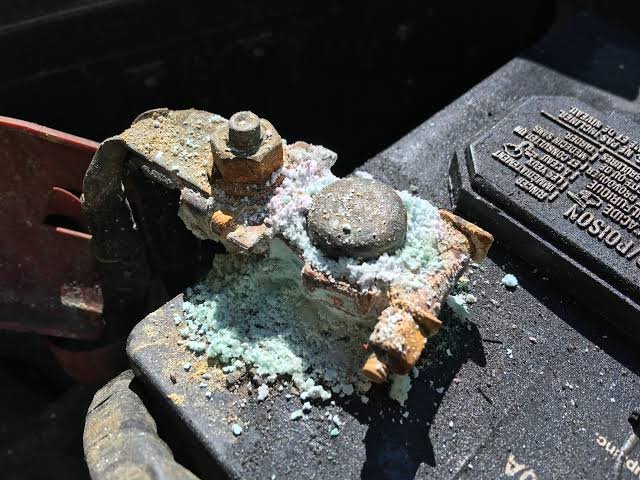
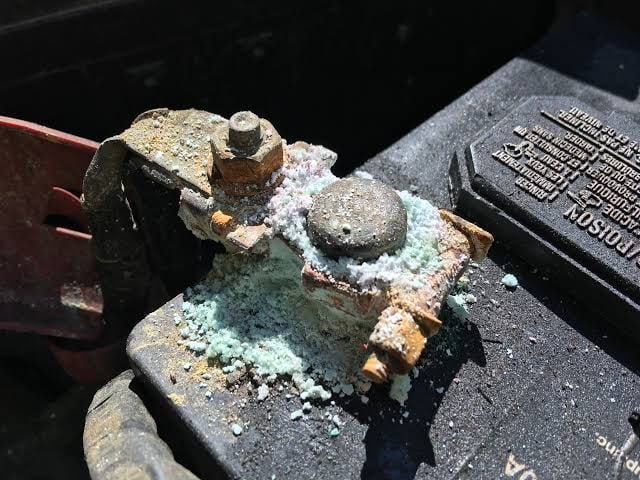
Before you grab your tools, it helps to know what causes battery corrosion. Corrosion appears as a powdery substance on the battery terminals. It’s most common on the positive terminal but can affect both sides.
Corrosion forms because of a chemical reaction between battery acid (sulfuric acid), the metal in the terminals, and air. Over time, small amounts of acid vapor escape from the battery. When these vapors mix with the metal and moisture, they create corrosion.
A few common causes include:
- Overcharging: When a battery gets more voltage than needed, it heats up and releases more acid vapor.
- Age: Older batteries are more likely to leak or vent acid.
- Loose or damaged terminals: Poor connections let more acid escape.
- Extreme temperatures: Hot weather speeds up chemical reactions, while cold can cause condensation.
Ignoring corrosion means risking poor electrical contact, slow starts, or even a dead battery. In rare cases, severe corrosion can eat through cables and cause expensive repairs.
Warning: Safety First
Car batteries store enough energy to start a car—and enough acid to cause burns or damage. Always put safety first when working on a battery.
Here’s what you need to do:
- Turn off the engine and remove the keys.
- Wear gloves and eye protection. Battery acid can irritate skin and eyes.
- Work in a well-ventilated space. Fumes are harmful if inhaled.
- Keep metal objects away. Never let tools touch both terminals at once.
- Have water and baking soda nearby. If acid spills, neutralize it quickly.
A surprising beginner mistake: skipping gloves. Even dried corrosion can irritate your skin. Always protect yourself, even for a quick cleanup.
Credit: www.reddit.com
Tools And Materials You’ll Need
Fixing battery corrosion is simple with the right tools. Most people already have these at home:
- Adjustable wrench or pliers (for removing cables)
- Wire brush or old toothbrush (for scrubbing terminals)
- Baking soda
- Clean water
- Small bowl or cup
- Paper towels or a clean rag
- Petroleum jelly or battery terminal protectant
- Gloves and safety glasses
Optional but helpful:
- Battery terminal puller (for stuck cables)
- Spray bottle (for water or cleaning solution)
Step-by-step: How To Fix Car Battery Corrosion Buildup
Follow these steps to clean your battery terminals safely and effectively.
1. Disconnect The Battery
Always disconnect the negative (-) cable first. This reduces the risk of short circuits. Look for a black cable or a minus sign. Use your wrench to loosen the nut, then gently lift the cable away.
Next, disconnect the positive (+) cable (usually red). Remove it the same way.
Never touch both terminals at once with a metal tool. This can cause sparks or even a shock.
2. Check For Damage
Before cleaning, look for any signs of:
- Cracked battery case
- Frayed or broken cables
- Loose cable clamps
If you see cracks or severe damage, the battery may need to be replaced. Don’t try to clean a leaking battery—take it to a professional.
3. Mix Your Cleaning Solution
In a small bowl, mix 1 tablespoon of baking soda with about 1 cup of water. Stir until the powder is dissolved.
Baking soda is a weak alkali. It neutralizes the acidic corrosion safely and cheaply.
4. Apply The Solution
Dip your brush into the baking soda solution. Scrub the corroded areas on the terminals and cable ends. You’ll see fizzing as the baking soda reacts with the corrosion—this means it’s working.
Keep scrubbing until all the powdery buildup is gone. For heavy corrosion, you may need to repeat this step.
5. Rinse And Dry
Use a spray bottle or a small cup to gently rinse the terminals with clean water. This washes away leftover baking soda and corrosion. Be careful not to flood the battery or cables.
Dry everything with paper towels or a clean rag. Water left behind can cause rust or poor contact.
6. Reconnect The Battery
Once the terminals are clean and dry, it’s time to put everything back.
- Reconnect the positive (+) cable first, and tighten with your wrench.
- Reconnect the negative (-) cable last.
This order prevents accidental short circuits.
7. Apply Protectant
Rub a small amount of petroleum jelly onto each terminal and cable clamp. This creates a barrier that slows down future corrosion. You can also use a special battery terminal spray.
Don’t skip this step. Many people clean their terminals but forget to protect them, and the corrosion comes back fast.

Credit: burtbrothers.com
What To Do If Corrosion Is Severe
Sometimes, corrosion is so bad that the cables are stuck or the terminals are badly pitted. Here’s what to do:
- Use a battery terminal puller if the cables won’t come off.
- If the metal is deeply damaged, replace the cable ends or consult a mechanic.
- Never try to force off a cable with a screwdriver—this can crack the battery.
If the battery case is bloated, leaking, or smells like rotten eggs, it’s unsafe. Replace the battery immediately.
How To Prevent Battery Corrosion
Cleaning is just part of the solution. To stop corrosion from coming back:
- Check your battery regularly (every oil change or 3 months).
- Keep terminals tight to prevent acid leaks.
- Use terminal protectors (felt washers or sprays).
- Avoid overcharging. Make sure your alternator is working correctly.
- Replace old batteries before they start leaking (usually every 3-5 years).
Here’s a quick comparison of common corrosion prevention methods:
| Method | Effectiveness | Cost | How Often |
|---|---|---|---|
| Petroleum jelly | Good | Low | Every cleaning |
| Spray protectant | Very good | Medium | Every 6 months |
| Felt washers | Good | Low | Replace with battery |
A non-obvious tip: If your car sits unused for long periods, disconnect the negative battery cable or use a battery maintainer. Sitting idle can speed up corrosion.
Common Mistakes To Avoid
Even experienced car owners sometimes make these errors:
- Using only water to clean: Water alone doesn’t neutralize acid. Always use baking soda.
- Skipping the protectant: Clean terminals will corrode again fast if not protected.
- Cleaning with the battery connected: This can cause sparks or shorts. Always disconnect cables first.
- Ignoring repeated corrosion: If buildup returns quickly, there may be an electrical or battery issue.
- Over-tightening cable clamps: This can crack the battery post or clamp.
Another beginner mistake: Using cola or soft drinks to clean terminals. While this works in an emergency, it leaves sticky residue that attracts dirt. Use baking soda and water for best results.
When To Replace The Battery
Cleaning helps, but sometimes a battery is too far gone. Replace your battery if you notice:
- Frequent corrosion even after cleaning and protecting
- Slow cranking or dim lights
- Swollen battery case
- Leaking fluid
- Battery is over 5 years old
Here’s a quick comparison of signs to watch for:
| Sign | Possible Problem | Action Needed |
|---|---|---|
| Frequent corrosion | Leaking or failing battery | Replace battery |
| Slow starts | Weak battery | Test/replace battery |
| Swollen case | Overheating/overcharging | Replace battery, check charging system |
| Cracked case | Physical damage | Replace battery immediately |
Extra Tips For Long Battery Life
- Drive your car regularly. Short trips or long periods of sitting can drain the battery and increase corrosion.
- Clean under the hood. Dirt and moisture around the battery create a better environment for corrosion.
- Check the charging system. If your alternator is failing, it can cause overcharging and more corrosion.
- Label battery cables if you remove them often, so you never mix up positive and negative.
A rarely mentioned insight: If your car has a “smart” charging system or start-stop technology, battery care is even more important. These systems are sensitive to poor connections and can trigger dashboard warnings with even small amounts of corrosion.
Frequently Asked Questions
What Causes Car Battery Corrosion The Most?
The main cause is acid vapor escaping from the battery, usually from the vent or around the terminals. Overcharging, old batteries, and loose connections all increase vapor release, which reacts with metal to form corrosion.
Is It Safe To Drive With Corrosion On My Battery?
It’s possible, but not recommended. Corrosion weakens the connection, which can lead to starting problems or electrical failures. Severe buildup can leave you stranded or damage expensive parts.
How Often Should I Clean My Battery Terminals?
Check and clean your battery terminals every 3-6 months or whenever you see corrosion. If your car has had corrosion problems before, check more often.
Can I Use Wd-40 To Clean Battery Terminals?
WD-40 can help loosen stuck parts but doesn’t neutralize acid. Baking soda and water are much better for cleaning. Use WD-40 only for removing rust, not as the main cleaner for battery corrosion.
Where Can I Learn More About Car Battery Care?
For more technical details and advice, see the Wikipedia car battery page for in-depth information.
Caring for your car battery is simple but makes a big difference. By fixing and preventing battery corrosion, you’ll save money, avoid headaches, and keep your car starting strong every time. With the right tools and these expert tips, you can handle battery maintenance with confidence.
Credit: www.reddit.com